
iCam365
Tange Inc.Tools
2.61.87K Reviews
- Version
- 3.63.5
- Installs
- 5.00M
- Age Rating
- Everyone
Screenshots
Our Review of iCam365
 Analysis by Appyee
Choosing a home-monitoring app starts with a practical question: do you already have a compatible camera, and do you want to check its view from your phone? iCam365 is a free tools app from Tange Inc. built around that kind of everyday remote viewing. It has a 3.7 average from around 26,000 ratings, and more than a million installs, so it is familiar to many users, though those numbers alone can’t tell you whether it suits your particular camera or routine.
I’d judge it less as a universal security solution and more as the control point for a camera-based setup. If your main goal is to glance at home while you’re away, receive movement alerts, and review footage, that focus can be useful. If you expect an app to supply cameras, guarantee uninterrupted monitoring, or replace a professionally designed security system, it’s important to set expectations before you start.
Start with the camera and the job you need it to do
The first decision is compatibility. iCam365 depends on a camera that works with it, so check that match before buying hardware or moving an existing setup. A camera app is only helpful when the camera can be added reliably and placed where it can see the area that matters. For a front door, for instance, framing the delivery spot is more useful than aiming broadly at a busy street.
Think, too, about what you want to check. A quick live view is different from keeping a useful record of events. If you only want to see whether your pet is in the room, live viewing may be enough. If you need to look back after an alert, recording and storage choices matter more. I’d decide which of those jobs is essential before spending time adjusting the setup.
As a tools app, it is aimed at a straightforward task rather than at managing every part of a smart home. That can be an advantage if you want a dedicated way to view compatible cameras without learning a much broader home-automation system. It can also be a limitation if you want one place to coordinate devices from different brands; a wider smart-home platform may be a better fit for that kind of household.
Using iCam365 day to day
Setting up iCam365 is a breeze. After downloading it from the App Store or Google Play, you're greeted with a user-friendly interface that walks you through every step. All you need is a compatible camera, and the app does the rest. It feels like the developers really thought about making this as intuitive as possible. You can have everything up and running in about 10 minutes, tops.
Features That Stand Out
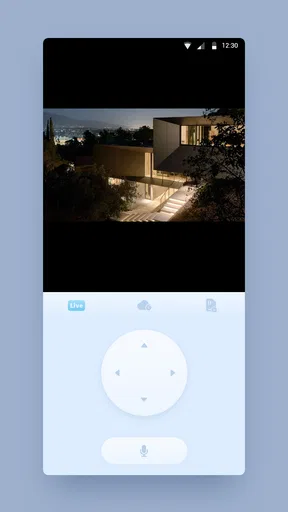
Now, let's talk about what you can do once it's all set up. The app offers live streaming, which means you can peek into your living room or porch in real-time. This feature is perfect for keeping tabs on pets or ensuring your package deliveries are safe. The video quality is top-notch, even in low light, thanks to the night vision capabilities.
Another cool feature is the motion detection alerts. Whenever something moves within the camera's view, you get an instant notification. It’s like having your own personal security guard. You can adjust the sensitivity settings, so you’re not bombarded with alerts every time a leaf blows by.
Motion alerts are most useful when they lead you to something you actually need to know. I’d begin with sensitivity set conservatively, then observe what triggers notifications during an ordinary day. If a moving branch or passing traffic keeps drawing attention, a slightly less sensitive setting can make the alerts more actionable. The trade-off is that reducing sensitivity may also mean missing some smaller movements, so the best setting depends on the camera’s view and what you’re trying to watch.
A realistic routine might be checking the porch after a delivery notification, then opening the live view to see whether the package is still there. If you later want to review what happened, the recording and timeline workflow becomes more relevant than the live stream alone. For a pet, a quick check during a break can be reassuring, but it is not a substitute for someone being physically present when an animal needs care.
Connectivity and Storage Options
What’s really impressive is the app's connectivity options. Whether you’re on Wi-Fi or using cellular data, the app maintains a stable connection. I’ve walked around my entire house without losing the stream, which is pretty sweet.
When it comes to storage, you’ve got options. You can either save recordings locally on your device or opt for cloud storage. The cloud option is a lifesaver if you want to access footage remotely, and it's encrypted for added security. Plus, the app offers different storage plans, so you can pick one that suits your needs.
Storage is worth thinking through before you rely on recordings. Local storage can suit someone who prefers to keep footage close to the camera or device, while cloud storage is more convenient when remote access to saved clips is important. Those choices involve different trade-offs around access, ongoing cost, and where footage is kept. I’d choose based on how often I genuinely expect to review video, rather than paying for a more elaborate setup just in case.
For a household with shared access, it also helps to agree on who will check alerts and who needs to review clips. Otherwise, several people may respond to the same notification—or assume someone else has already checked it. A simple routine, such as one person reviewing an alert and letting the others know if it needs attention, can make a camera feed more useful without changing the equipment.
Ease of Use and Navigation
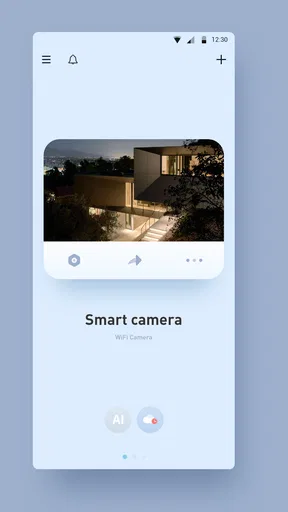
The layout of the app is sleek and simple, which I appreciate. You don’t need to be tech-savvy to find your way around. The main screen shows all your cameras, and tapping on one gives you a full-screen view. From there, you can access settings or review past recordings.
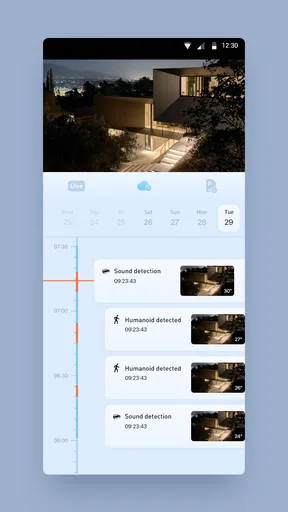
There’s also a timeline feature that lets you scroll through recorded footage quickly. It’s a handy tool for when you want to review specific incidents without sifting through hours of video.
The timeline is particularly valuable when you know roughly when something happened. A practical habit is to note the time you received an alert, then use that point as a starting place when reviewing footage. That narrows the search and makes recorded video less of a passive archive. If you are considering the app for an event that may need careful documentation, test the playback and retrieval process before depending on it; a camera view is only useful if you can find the relevant clip later.
For privacy, I’d also treat camera placement as part of setup rather than an afterthought. Aim at the area you actually need to monitor and avoid capturing private spaces unnecessarily. Anyone with access to the account should understand what the camera covers and how recordings are handled. Convenience is not a reason to leave a camera pointed at a place where household members expect privacy.
When another kind of setup makes more sense
Compared with the usual alternatives, iCam365 sits on the camera-app side of home monitoring. A camera maker’s own app may be the more straightforward option if you already own that maker’s hardware and want its specific controls. A broader smart-home app is more appealing if your priority is bringing cameras together with other connected devices. A dedicated security service is worth considering if you want a more managed arrangement rather than handling camera setup, alerts, and footage yourself.
Those alternatives are not automatically better; they simply solve different problems. The useful comparison is whether your existing camera works with iCam365, whether you need only viewing and recording or a broader system, and whether you are comfortable managing storage choices. I would not switch a working setup just because another app sounds more comprehensive. First check what you would gain, and whether the replacement would still support the camera you rely on.
There is also a real switching cost in the time spent reconnecting a camera, setting its view, and tuning alerts again. Before moving from another app, make a note of the camera’s position and the alert behavior you actually want. If saved footage matters, review or preserve anything you need before changing how recordings are stored. This small bit of planning can prevent the frustrating situation of discovering that the new workflow does not match the old one after you have already made the change.
Who should choose it—and who should pass
I’d consider iCam365 if I had a compatible camera and wanted an accessible way to check home, watch a pet briefly, or see whether activity occurred near an entryway. It is also a reasonable direction for someone who values a simple camera list and quick access to live viewing rather than a large collection of smart-home controls. The app is free to download, but in-app purchases range from $0.99 to $199.99 per item, so check the purchase details in the app before committing to a storage plan or other paid option.
I’d look elsewhere if camera compatibility is uncertain, if you need a managed security service, or if keeping a long, dependable record is the central requirement and you have not tested the storage workflow. It may also be the wrong choice if you do not want to configure alerts or make decisions about where footage is saved. A simple camera feed can help with awareness, but it should not be mistaken for a guarantee that an incident will be prevented or captured.
The app is rated for Everyone, and its current version is 3.58.4. It was released on March 13, 2020, and requires Android 7.0 or later. Those details make it easier to check basic fit for an Android device, but they do not replace checking whether the particular camera and phone combination works as expected.
The Verdict
After spending some quality time with iCam365, I can honestly say it’s a solid choice for anyone looking to keep their home safe. It’s reliable, easy to use, and packed with features that make monitoring your space effortless. The peace of mind it offers is well worth the installation effort.
If you’re in the market for a home surveillance app, give iCam365 a shot. It’s like having an extra pair of eyes, and who wouldn’t want that?
My recommendation is more specific: choose it when a compatible camera, clear viewing needs, and a manageable recording routine line up. Before relying on it, test live viewing away from home, trigger a harmless movement alert, and make sure you can locate a saved clip. That quick rehearsal tells you more than simply installing the app and assuming everything is ready.
For a modest, practical check-in tool, that is a sensible starting point. For security needs where missed footage would have serious consequences, I’d compare it carefully with a purpose-built service and verify the full camera-and-storage setup first. In short, iCam365 can make everyday monitoring easier, but the camera, placement, and recording choices determine how much confidence it really gives you.
Verdict
Strengths of iCam365
- Easy-to-use interface for quick setup.
- Compatible with multiple smart devices.
- Offers real-time video streaming.
- Includes motion detection alerts.
- High-quality video resolution.
Limitations of iCam365
- Subscription needed for full features.
- Occasional connectivity issues.
- Limited free cloud storage.
- No desktop application available.
- Notifications can be delayed.
Similar Picks in This Category
View All
Google LLC4.0

Gboard - the Google Keyboard
Google LLC4.5

Google Play services
Google LLC4.3

Google Play Store
Google LLC4.9

Files by Google
Google LLC4.5

SHAREit: Transfer, Share Files
Smart Media4U Technology Pte.Ltd.4.3
Frequently Asked Questions
What is iCam365 and what are its main features?
iCam365 is a versatile security app designed to provide real-time surveillance for your home or office. Key features include high-definition video streaming, motion detection alerts, two-way audio communication, and cloud storage options. The app supports multiple camera feeds, allowing users to monitor several locations simultaneously, ensuring a comprehensive security solution.
Is iCam365 compatible with all camera models?
iCam365 is compatible with a wide range of IP camera models. However, it is recommended to check the specific compatibility list provided by the app to ensure your camera is supported. Compatibility can vary based on camera firmware and model specifications, so confirming this before downloading the app is crucial.
How secure is the data stored by iCam365?
iCam365 prioritizes user security by employing end-to-end encryption for all video streams and stored data. Users can choose between local storage on their devices or secure cloud storage solutions provided by the app. Regular updates are released to address any security vulnerabilities, ensuring data remains protected from unauthorized access.
Does iCam365 offer a free trial or premium subscription options?
iCam365 offers a basic free version with limited features, allowing users to test its functionalities. For more advanced features like extended cloud storage, enhanced video quality, and priority customer support, users can opt for a premium subscription. Pricing details and subscription plans are available within the app.
How user-friendly is the iCam365 app for beginners?
iCam365 is designed with an intuitive interface, making it accessible for users of all experience levels. The setup process is straightforward, with step-by-step guides and tutorials available within the app. Additionally, customer support is readily available to assist with any setup or operational queries, ensuring a smooth user experience.
